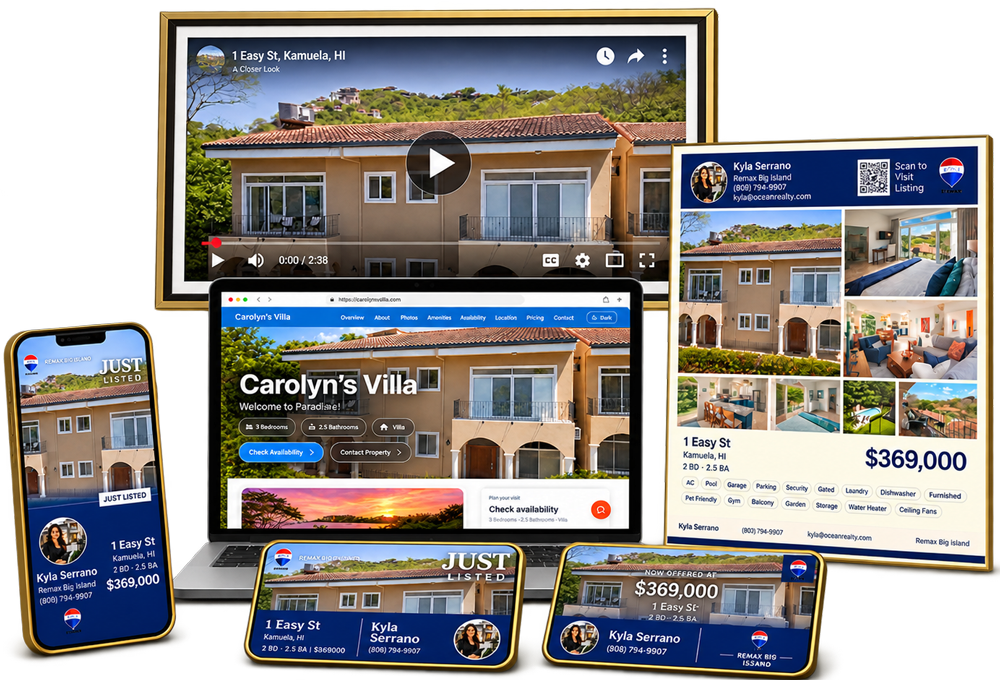
Complete suite of tools built for real estate

One listing.
Endless content.

Start with cinematic listing videos, then use P2V Lens Credits to create photo upgrades, branded marketing assets, reports, social content, remixes, and website-ready property media.

Listing videos from $4/clipLens Credits for AI toolsSave outputs to property pages

Lens tools are credit-based. Video orders are optional after saving tool outputs, not required.

Phase 01
The main product

It starts with the listing video.

$4
Per clip
5 clips
Minimum
3
Formats
Core product

Cinematic listing videos

Upload property photos and get a polished video built for listings, social, websites, and seller presentations.

  • Cinematic walkthrough video
  • Individual room clips
  • Property media saved in one place
Video tools

Remix, resize, and narrate

After the main video is created, Lens video tools help turn the same clips into more formats and versions.

  • Vertical reels, square videos, and landscape versions
  • Branded remixes and social edits
  • AI voiceover videos when narration helps the listing
$4
Per clip

Order a Video

Turn listing photos into a cinematic walkthrough video with polished camera movement, music, and a finished property profile.

3
Formats

Video Remix

Create new cuts from your delivered clips, including vertical reels, square videos, landscape versions, branded edits, and social teasers.

AI
Narration

AI Voiceover Tool

Create narrated versions of listing videos and clips with AI-generated scripts, voice options, timing controls, and review before export.

Phase 02
The photo workflow

Photo tools make every image more useful.

Lens photo tools are designed around the property page. Finished image outputs should save back to the exact property, where they can be reviewed, reused in marketing, or optionally sent into a video order when the customer chooses.

1–10
Photo score

Photo Coach

Score property photos and get practical shot feedback so agents can improve angles, lighting, composition, and listing-ready coverage.

1-click
Enhance

Photo Enhancement

Improve brightness, color, white balance, and exposure, then save clean optimized outputs back to the exact property page.

Batch
Optimize

Photo Optimizer

Compress and resize listing photos for MLS, portals, web, and social without making the image workflow complicated.

3
Exposures

HDR Photo Blend

Blend bracketed exposures into balanced, true-to-life listing images that look clean without feeling fake.

8
Draw tools

Drone Mark

Mark aerial photos with lot lines, arrows, labels, pins, and callouts for land, location, access, and property features.

Credits
Per image

Virtual Staging

Stage empty rooms with AI, compare before and after, and save the staged image to the property for optional video use.

Phase 03
The content multiplier

Marketing tools turn one listing into a complete campaign.

Design Studio

Listing collateral

Design Studio creates polished property marketing collateral for listings, presentations, print, and email.

  • Listing flyers and property PDFs
  • Email footer and biz-card style assets
  • Yard signs and future AI Design graphics
Branding Tool

Brand templates

Branding Tool is the dedicated home for the reusable social and branding template workspace.

  • Agent spotlight and brokerage graphics
  • Luxury, modern, and infobar style templates
  • Reusable branded social and video-layout assets
PDF
Print assets

Design Studio

Create listing collateral such as flyers, property PDFs, email footers, business-card style assets, and yard signs.

Brand
Templates

Branding Tool

Create reusable branded social templates, agent spotlight graphics, brokerage assets, and branded video-style layouts.

4
Styles

Description Writer

Generate MLS-ready listing descriptions in multiple tones using property details and listing context.

PDF
Reports

Buyer & Seller Reports

Create branded buyer and seller guides with polished PDF output for leads, clients, and listing presentations.

30
Day sprint

Social Content Studio

Plan social posts, generate captions, rotate featured properties, and build a usable content calendar around your listings.

Site
Builder

Agent Website Builder

Build a branded agent website and property pages that can showcase videos, photos, reports, and marketing assets.

Coming Soon
Soon
Coming

Location Value Score

Create a branded neighborhood value score covering amenities, growth signals, location strengths, and buyer-facing context.

Coming Soon
Soon
Coming

Value Boost Report

Generate seller-focused improvement ideas with estimated cost, effort, and potential listing impact.

Phase 04
Pay as you go

Lens Credits keep things simple.

Credits

Use credits for Lens actions

Lens tools use credits for generation, enhancement, staging, reports, exports, and other AI-powered actions.

  • Clear credit pricing before eligible actions
  • See your Lens Credit balance before using tools
  • Buy more credits only when you need them
Property-first

Save outputs where they belong

Lens outputs stay attached to the property so your listing media remains organized and reusable over time.

  • Keep assets attached to the correct property
  • Save finished outputs to the property page
  • Reuse saved assets across tools and marketing
Optional video handoff

Video order is optional

Turn saved photo outputs into a listing video whenever you want, without requiring a video order to use Lens tools.

  • Send selected photos directly into a video order
  • Carry selected saved outputs into the order flow
  • Keep video ordering optional
Start with one listing

One listing.
Endless content.

Order the cinematic video first, then use Lens Credits to build the rest of the listing campaign around the same property media.